Databricks for Engineering, Fabric for Reporting
A lot of the architecture debates I sit in treat Microsoft Fabric and Databricks as rivals, where one has to win the whole stack. In practice I keep landing somewhere more boring and more useful: do your data engineering in Databricks, do your reporting in Fabric and Power BI, and connect the two so the Databricks output flows into Power BI with little or no copying. This post is my field notes on making that pairing work, including the clean path and the messier workaround I needed when the clean path was off the table.
One caveat before I start. This space moves fast, and Microsoft ships changes to Fabric on a cadence that makes any "Fabric can't do X" statement risky. Everything here is current-state and experience-based as of this writing. Some of it will age.
Why Databricks for the engineering, right now
Plenty of enterprise organizations already prefer Databricks for their heavy data engineering, and in my current experience that preference is well founded. For enterprise-grade pipelines, Databricks tends to be the more reliable place to do the work today, and I will give one concrete reason rather than hand-wave. In the Fabric lakehouse, scheduled jobs and similar items have often been tied to the identity of the individual user who set them up, rather than to a durable workspace identity or a service principal. For an enterprise that is fragile. People change teams and leave companies, and you do not want a production refresh quietly bound to one person's account. To be fair, Fabric workspace identities have been improving, and I am hopeful this rough edge gets resolved soon. I am describing where things stand in my hands, not handing down a permanent verdict.
Why Fabric for the reporting
The flip side is that Databricks is not always the best place to serve reports. Microsoft has been moving quickly on the reporting side of Fabric and Power BI, and that pace is hard to ignore. Direct Lake semantic models, the tight OneLake integration, and the general Power BI experience make Fabric a strong reporting layer. So instead of forcing one tool to do everything, pair them. Engineer in Databricks, report in Fabric, and the interesting question becomes how you connect the two without paying for the data twice.
The clean path: shortcuts and Direct Lake
When everything lives in one tenant, the integration is close to a no-brainer.
Databricks writes Delta Lake tables, which are Parquet files plus a transaction log, into ADLS Gen2 (Azure Data Lake Storage). From your Fabric lakehouse you create a OneLake shortcut that points at those Delta tables. A shortcut is a reference, not a copy, so the data stays where Databricks wrote it. On top of the shortcut you build a Direct Lake semantic model, and Power BI reports straight off that data.
Two wins fall out of this, and they are the whole reason the path is so attractive:
- There is no data copy from Databricks to Fabric. The shortcut reads the same Delta files Databricks produced.
- With Direct Lake there is no import into the semantic model, so there is no data refresh to schedule. The model reads the Delta files directly. It does reframe to the latest Delta version when the data changes, but that is a metadata-only operation that happens automatically, not a copy you have to babysit.
Put those together and the workflow is genuinely pleasant. You run your Databricks jobs, the Delta tables update, and the new data is immediately available to your Power BI users, with no copy step and no data refresh to babysit. When you can use it, this is the path to reach for.
The complication: different tenants and secured storage
The clean path assumes a single tenant. On a recent engagement that assumption did not hold. Databricks and Fabric lived in separate tenants, and that changes the picture in a few ways that are worth being precise about.
OneLake shortcuts do not cross tenant boundaries, so the shortcut path was gone. The storage account behind Databricks was also secured, and in that cross-tenant situation shortcuts do not work with managed private endpoints either. For completeness I also looked at Databricks mirroring in Fabric, the Mirrored Azure Databricks catalog, and that does not work across tenants in my experience either.
It is worth keeping these three mechanisms separate in your head, because they are easy to conflate. Shortcuts are references in OneLake, mirroring is Fabric's Mirrored Azure Databricks catalog, and Delta Sharing is a Databricks sharing protocol. They are three different things, and in this cross-tenant, secured-storage scenario the first two were both off the table.
The workaround that actually worked: Delta Sharing
That left Delta Sharing, and it got the data into Fabric. This path does copy the data, which sounds like a step backward, but the copy turned out to be cheap. Delta Sharing gives secured access to the shared tables through a token. Behind the scenes it hands the recipient short-lived credentials so they can read the underlying files. My read of the mechanics is that it hands out short-lived, pre-signed access to the files, which on Azure is effectively a SAS-style URL, scoped and time-limited rather than a standing key.
The Fabric side took some setup. Here is the sequence that worked for us:
- Create a custom Fabric Spark environment. You want a dedicated environment, not the default one.
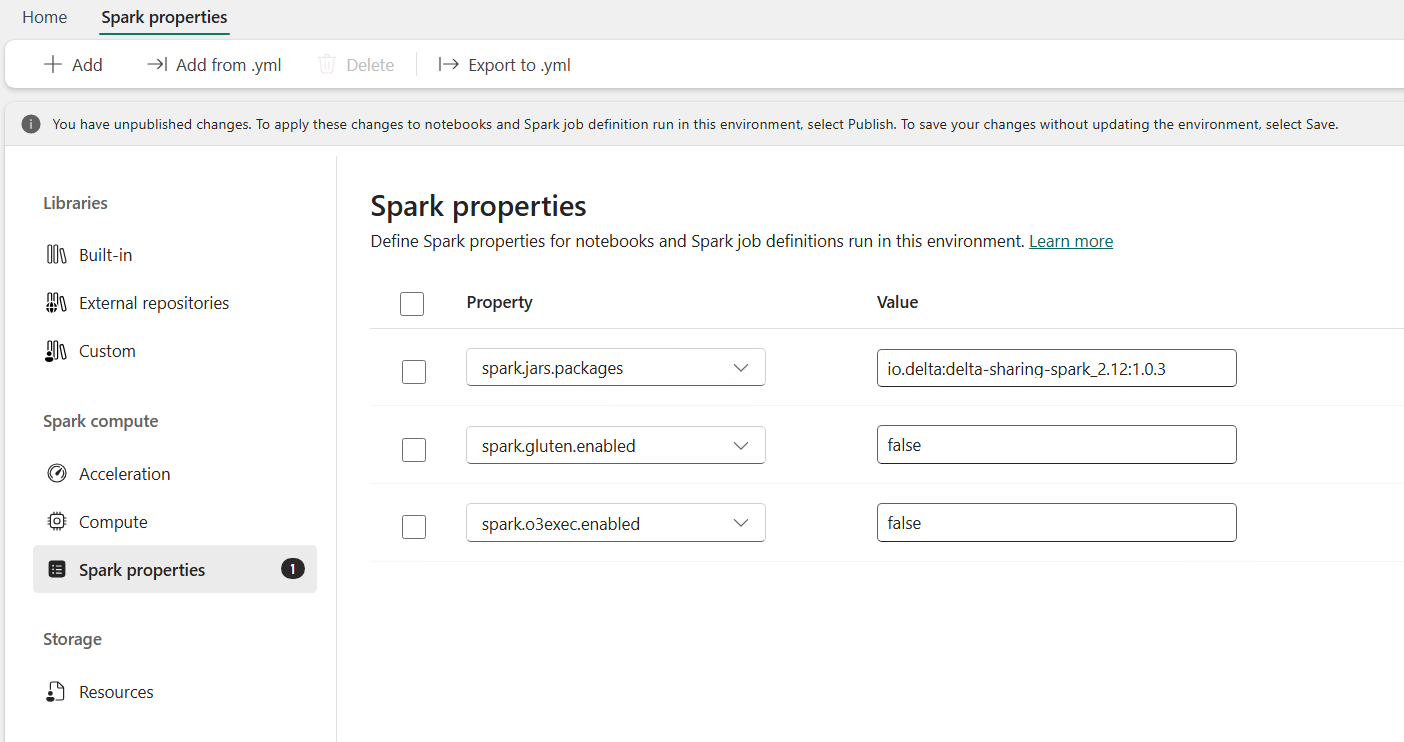
- Install the Delta Sharing library into that environment. The cleanest way is to add it as a Spark property on the environment. Set
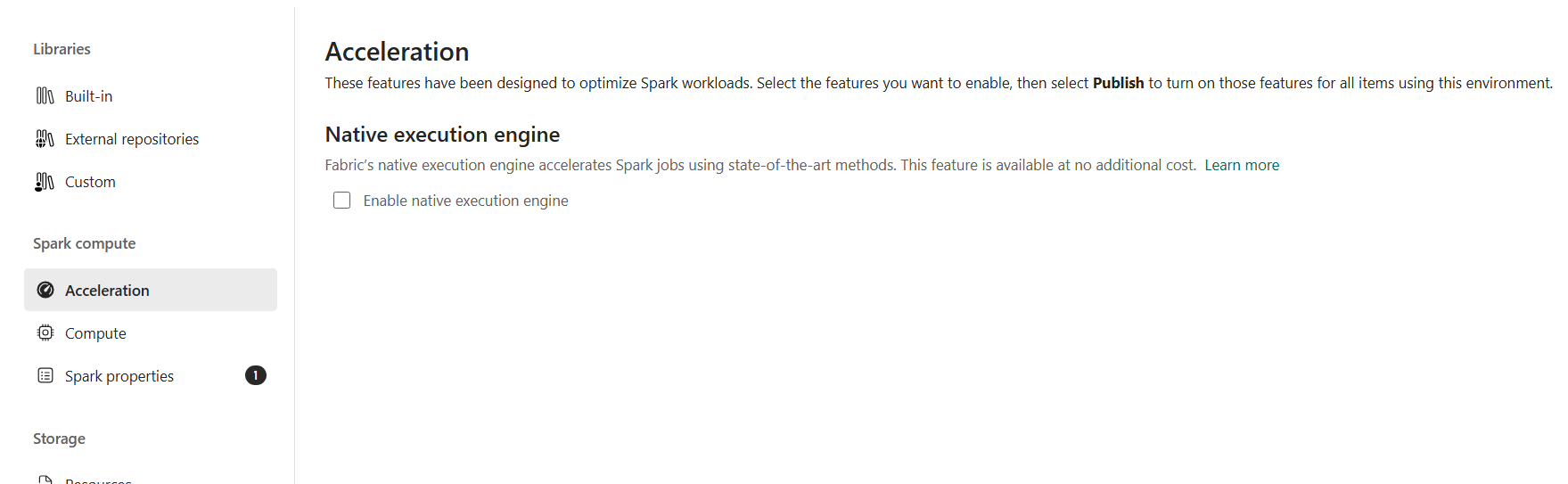
spark.jars.packagestoio.delta:delta-sharing-spark_2.12:1.0.3. Pin the version rather than floating it, so a later package update does not quietly change behavior under you. - Turn off the Native Execution Engine for this environment. The Fabric Spark Native Execution Engine acceleration is not compatible with Delta Sharing in my experience, so you do not use that acceleration here. In practice that means unchecking the native execution engine on the Acceleration page and setting
spark.gluten.enabledandspark.o3exec.enabledtofalsein the Spark properties. - Connect to the Delta Share from that environment and read the data.
Here is what the Spark properties on the environment end up looking like:
And the Native Execution Engine stays off on the Acceleration page:
One more safety net. If you cannot guarantee the environment has the Native Execution Engine off, or someone turns it back on later, you can force the right behavior from inside the notebook. Setting these at the top of the notebook pushes Delta Sharing reads down the V1 source path and keeps the session off the native engine, so the notebook still runs:
spark.conf.set("spark.native.enabled", "false")
spark.conf.set("spark.gluten.enabled", "false")
spark.conf.set("spark.sql.sources.useV1SourceList", "deltaSharing")  # force V1 source path
There was one more wrinkle around security. The share was locked down, so I used managed private endpoints from the Fabric workspace to the Delta Share's ADLS resource. That combination worked well. Note the contrast with the shortcut case: shortcuts plus managed private endpoints did not work cross-tenant, but reading a Delta Share over managed private endpoints did.
Performance: the copy is not the dealbreaker it sounds like
The obvious objection to this workaround is that you are copying data, and copying feels slow and expensive at enterprise scale. In practice it was neither. On the capacity we had, we copied a table of about 1.3 billion rows in just a few minutes, and that was a full copy. Moving to an incremental copy, where you only pull what changed, would very likely bring it under a minute. So while the clean shortcut path is still the one I prefer when it is available, the Delta Sharing copy is fast enough that I would not let "but it copies" talk me out of it.
A side note: Copilot in Fabric notebooks has caught up more than I expected
While I was doing all of this Fabric and Databricks work in notebooks, I went back and tried Copilot in the Fabric notebooks again, almost by accident. I was surprised by how much it had improved.
For a good while, Databricks was clearly ahead here. The assistant inside Databricks notebooks could take a prompt and add cells, modify cells, run and test them, and troubleshoot, all with very little hand-holding. Microsoft's Copilot lagged that for months, and I had quietly filed it under "not there yet."
Microsoft has since closed a lot of that gap. As of when I last looked, Copilot in Fabric notebooks can do much of the same. It can modify the notebook, it carries the context of the whole notebook, and it can even look at other notebooks in the workspace. I have not tried going across workspaces yet. Here is a concrete example: you can point it at an older version of a notebook saved under a different name and say "this one works but this new one does not, what is going on," and it will work through that, execute cells, test, troubleshoot, and make changes without much interaction from me. That was a real improvement.
The lesson I want to leave you with is simple. These AI tools change constantly, so if you do not go back and re-try them, you will not actually know what they can do today. I make a point of staying current on Copilot specifically, because many clients are limited to Copilot and cannot freely use Claude or other frontier models. Copilot still lags the frontier models in general capability, and Claude is one example that is ahead. But the gap moved, and it pays to re-test your assumptions rather than carry last year's verdict. When a client genuinely needs something only another model handles well, that becomes a real and worthwhile conversation about getting them the right subscription, whether that is Anthropic's Claude, ChatGPT, or whatever fits best.
Field notes, not a verdict
That is the shape of the pairing as I have been running it: Databricks for the engineering, Fabric and Power BI for the reporting, the OneLake shortcut and Direct Lake path when tenants and storage allow it, and Delta Sharing through a custom Spark environment when they do not. I have tried to flag which parts are documented behavior and which parts are simply what worked for us, because this is a fast-moving target and some of these edges will move.
I am genuinely curious what other people are doing with hybrid architectures. If you have paired Fabric and Databricks, or stitched together some other combination across tenants, I would like to hear how you handled the seams.