Synapse is retiring trusted-services access on 1 August 2026, and it may mean a new workspace
Microsoft recently sent a notice that is easy to skim past and expensive to ignore. It announces that the trusted-services function in Azure Synapse Analytics is being retired, with a firm date of 1 August 2026. The language is dry and the impact is large, so I want to translate it into what it actually means and why it deserves attention now rather than closer to the deadline.
What is being retired, and the date
Today many Synapse workspaces reach an Azure Storage account or an Azure Key Vault using a managed identity together with a firewall exception. That exception is the trusted-services allowance, and it permits the Synapse service to reach the storage or Key Vault firewall because Microsoft treats it as a first-party service. On 1 August 2026, that allowance is removed.
The replacement is private networking. Instead of a firewall exception, your workspace reaches Storage and Key Vault through a managed virtual network using managed private endpoints. This is a stronger security model. The hard part is the work required to get there.
The change does not degrade gracefully. If no action is taken, the paths that depended on the trusted-services exception will stop working, and a Synapse workspace that cannot read its storage or its secrets cannot operate. This is a deadline that interrupts production workloads, not an optional cleanup.
Why this is the typical installation, not an edge case
It is natural to assume that only heavily hardened environments are affected. In practice, the opposite is true. The at-risk configuration is the ordinary result of following the installation guidance carefully.
When you stand up Synapse Link for Dataverse, Microsoft's guidance directs you to set the landing storage account firewall to Selected networks. That is the appropriate next step after the wizard completes, because the storage account should not remain open to the public internet. Trusted Azure services are then allowed through so that Synapse can continue to reach the account. That combination, a restricted firewall together with the trusted-services exception, is precisely the pattern being retired.
The population at risk is therefore not the teams that did something unusual. It is the majority that followed the security-conscious install. A fully open storage account, which is technically unaffected, typically appears only on demonstration tenants or in environments where the firewall was never tightened. If you followed the secure setup, you are more likely to be affected, not less.
The create-time-only trap
The managed virtual network is the workspace property that lets you use managed private endpoints. That property can only be enabled when the workspace is created. Microsoft does not provide a way to enable it on a workspace that already exists.
As a result, if your workspace was not created with the managed virtual network enabled, this is not a setting you can change in the portal. The practical remediation is to deploy a new Synapse workspace with the managed virtual network enabled from the outset and migrate your work onto it.
It is also worth remembering that every Synapse workspace has an associated primary storage account, an ADLS Gen2 account that holds its saved queries, pipelines, and related artifacts. The workspace and its storage are closely tied, which is part of why repointing an existing workspace is not straightforward.
How to tell if you are affected
This assessment is something you can run yourself today, at no cost, in a few minutes, and it establishes whether you are affected.
First, identify the relevant storage account. This is the landing storage account for your Synapse Link, found in the Power Apps maker portal under Azure Synapse Link for Dataverse, then the link entry, then Details. Copy the value shown under Storage Account.
With the correct account name, run the following Azure CLI query. Reader access on the storage account is sufficient for it to return cleanly.
az storage account show --name <landingStorageAccount> --query "{publicNetworkAccess:publicNetworkAccess, defaultAction:networkRuleSet.defaultAction, bypass:networkRuleSet.bypass, ipRules:length(networkRuleSet.ipRules), privateEndpoints:length(privateEndpointConnections)}" -o tableInterpret the result against three cases.
- If you see
defaultAction: Denytogether withbypass: AzureServicesandprivateEndpoints: 0, and the paired workspace has no managed virtual network, then you are at risk and a rebuild is required before 1 August 2026. You confirm the managed virtual network status on the workspace Overview page in the Azure portal. - If you see
defaultAction: Allow, then the firewall is not load-bearing. There is no trusted-services bypass to retire, so this specific change does not affect you. - If you see a private endpoint already in place and the workspace already has a managed virtual network, then you have already migrated, and there is nothing to do here.
The middle case is worth a closer look. If your storage account accepts public traffic from all networks, the retirement does not affect you on 1 August 2026, but the only reason it does not is that the account is currently open to all networks, which is a risk worth addressing in its own right. Once you properly restrict the firewall to selected networks, you return to the at-risk pattern. A fully open account defers the deadline; it does not remove the underlying work. I would still plan a move to the private-networking model on a measured timeline, so the account can be locked down properly soon after.
If you prefer to confirm this in the portal rather than the CLI, the at-risk setting lives on the storage account's Public network access page. Public network access is set to Enable, and the scope beneath it is set to Enable from selected networks. That is the firewall-on, trusted-services-allowed state, and it is the one that breaks on 1 August 2026.
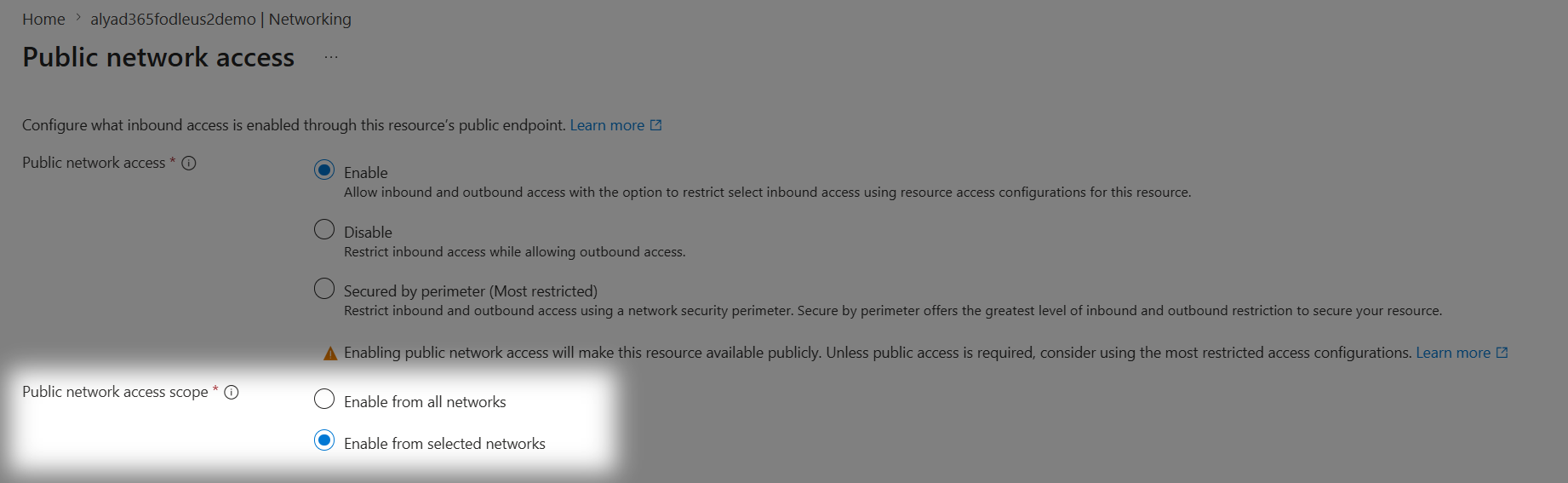
This is also why the pattern is so common among Synapse Link users on D365. If you stood Synapse Link up with the enterprise policy and managed identity option, which lets Dynamics 365 write to the storage account directly while the firewall stays on, then "Enable from selected networks" is exactly the configuration you end up with. If you did not use the enterprise policy option, you had to leave the storage open to all networks instead, which drops you back into the wide-open case above. Either way, the more secure, locked-down setup is the one affected by the deadline.
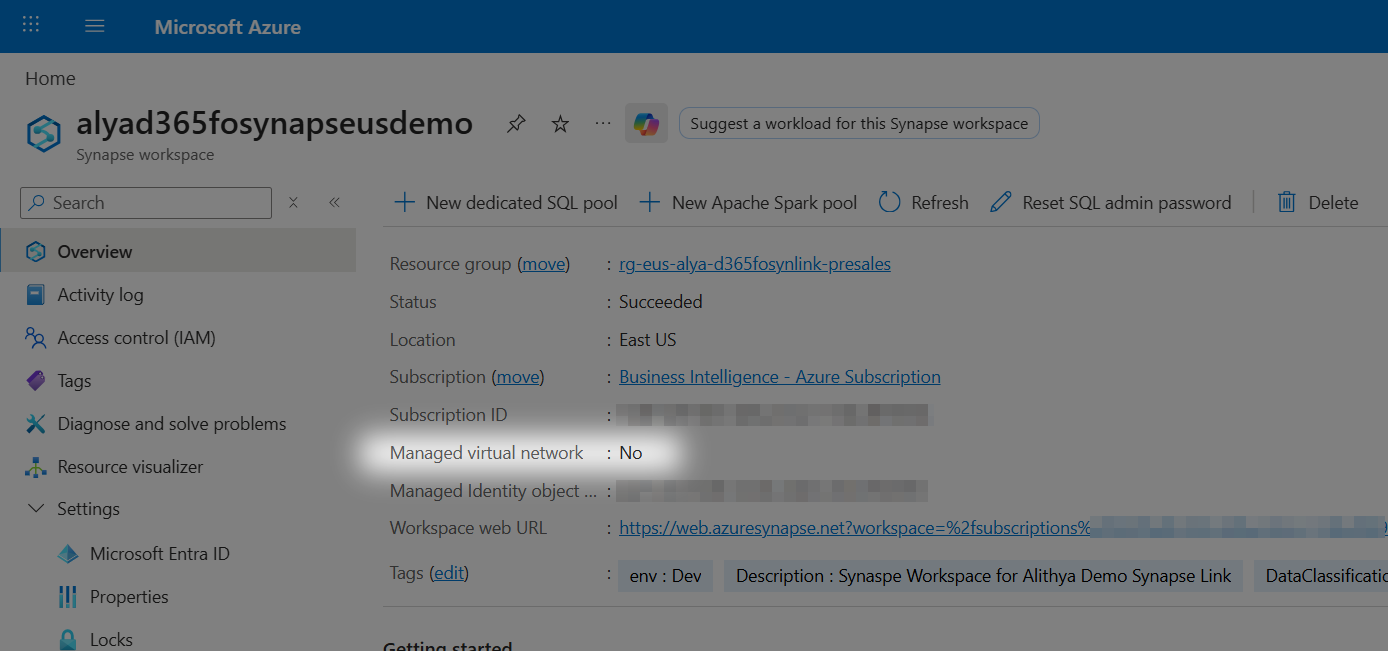
On the workspace side, the at-risk condition is just as easy to confirm. Open the workspace in the Azure portal and look at the Overview page. If "Managed virtual network" reads No, that is the property you cannot change after creation, and it is the reason a rebuild may be required.
One further caveat applies to the storage check. The probe above looks at the storage account, but the same trusted-services logic applies to any Azure Key Vault your workspace reaches through a firewall. If your storage turns out to be open but you have a firewalled Key Vault that Synapse reaches as a trusted service, that path is on the same timeline, so confirm both.
That is the whole diagnosis. It genuinely takes about five minutes, and it is free. Knowing where you stand is the part you can do yourself today.
Two common but incorrect conclusions
Two readings of the portal appear reassuring and are not.
The first concerns public network access. Seeing "Enabled" on that setting is not the same as wide open. "Selected networks" still shows as Enabled, because the public endpoint exists, but it sits behind a restricted firewall, and that restricted-plus-trusted-services state is precisely the at-risk pattern.
The second concerns a private endpoint on the storage side. If your team added a customer-side private endpoint to the storage account, it is reasonable to assume that covers you. It does not. A Synapse workspace without a managed virtual network still routes its traffic over the public endpoint using the trusted-services bypass, so a private endpoint added on the storage side does not carry the Synapse traffic. The endpoint that matters is a managed private endpoint from the workspace, and that requires the managed virtual network you cannot add later.
Do you need to rebuild? Walk the decision
Two questions decide most of this: whether you are on the trusted-services path at all, and whether the managed virtual network was enabled when the workspace was created. Everything after that is scoping. Here is the whole decision in one view.
Who this hits hardest
The group most affected is Microsoft Dynamics 365 Finance and Supply Chain customers who use Synapse Link. The retirement actually reaches Synapse Link for Dataverse more broadly, including the customer engagement apps as well, so do not assume you are exempt simply because you are not a finance and operations shop. That is a large population, and many of them are not deep Azure specialists. They adopted Synapse Link because it was the supported way to get D365 data into a lake, not to take on Synapse networking.
Many of these same customers were recently moved off Export to Data Lake and onto Synapse Link or Fabric Link. The teams that chose Synapse Link completed the migration they were directed to make, and those without the managed virtual network enabled now face another transition soon after.
The fix, at a high level
Because the managed virtual network can only be enabled when a workspace is created, the remediation is to stand up a new workspace with it enabled and migrate your work onto it. There is no in-place toggle that makes this go away.
This does not have to mean an outage. The new workspace can run in parallel with the old one, and the old one keeps working right up until you choose to cut over. The deadline forces a rebuild, but it does not force downtime, so the work can be planned deliberately rather than compressed into a high-risk maintenance window near the deadline.
How involved the rebuild is depends entirely on what you built. A workspace that only uses Synapse Link and external tables to read from an ADLS account is a contained move. A workspace with dedicated SQL pools and a large set of pipelines is a substantial migration that requires testing. The effort is not uniform, so it should be assessed against your actual environment rather than estimated with a single figure.
Map your downstream consumers first
If I could recommend one thing before touching anything else, it would be to inventory everything that consumes the current workspace. A new workspace very likely means a new Synapse serverless endpoint hostname, and every connection pointed at the old hostname has to be repointed.
The range is wide. A single ETL connection into a downstream warehouse is the easy case, because there is one owner and one connection string. Analysts connecting directly from SQL Server Management Studio are harder, because the connections are scattered and you may not know who all of them are. Scheduled jobs that pull data into an on-premises database are harder still, because they run unattended, so a broken hostname shows up as silent missing data rather than a loud error.
The networking change is the same regardless of how many consumers you have. The repointing is where the effort actually lives, so map it before you commit to a timeline.
Bottom line
Do not wait. The date is 1 August 2026. If you have not addressed this before then, there is a real risk that your Synapse workspace stops working for these paths. Run the self-check above today, confirm whether your workspace has the managed virtual network enabled, and if it does not, begin planning the new-workspace move and the downstream repointing while you still have runway. There may be exceptions for customers who genuinely cannot transition in time, but that is not something to plan around. Treat the date as firm.
The diagnosis is the part you can do yourself, and I have included all of it here on purpose. The rebuild and the migration are a different matter. They involve real work and real risk, and the difference between a controlled, no-downtime cutover and a last-minute effort comes down to planning and experience. That controlled, parallel migration is the kind of work my data and analytics team at Alithya does. We can run the assessment, confirm exactly where you stand, and put together an estimate for the rebuild and the downstream repointing scoped to your actual workspace rather than a generic one. If you would like that, I am glad to talk through your specifics.
References
- Azure Synapse Link transition FAQ (Microsoft's canonical notice and remediation guidance)
- Synapse Link for Dataverse with a managed identity (the "Selected networks" plus trusted-services install pattern)
- Azure Synapse Link for Dataverse prerequisites (where the older "managed virtual network not supported" line still lives, now superseded by the transition FAQ)
- Synapse workspace managed virtual network (the create-time-only constraint)
- Synapse workspace managed private endpoints
- Storage network security and trusted access based on a managed identity